Geometric Similarity Search: Find CAD Models, Avoid Duplicates

Do you lack an overview of the components in your company? Do you spend a long time searching for existing parts, only to end up designing them from scratch?
With simus classmate, you can automatically capture your CAD inventory—even retroactively. You can find similar components based on geometry or features, immediately see what already exists, and increase the reuse rate in your design process.

Softwaregestützter geometrischer Vergleich zweier Bauteile

Find Similar Parts: How the Similar Parts Search Works

Classmate creates a “geometric fingerprint” for each 3D model. This makes your CAD data searchable and allows you to find it quickly and reliably, regardless of the file name.

With our flexible search interface, you can search in whatever way works best for your task:

  • By geometry: You specify a reference model, and simus classmate provides similar parts.
  • By characteristics: For example, material, dimensions, or class.
  • Combined: First, find similar geometries; then narrow down the results by characteristics.

simus classmate works directly within your CAD program. It also identifies subassemblies within models, matching counterparts, and tools. The Model Monitor automatically displays how many similar parts already exist and their manufacturing costs.

Automatically Classify CAD Models

A good search requires clean data. simus classmate automatically classifies your 3D models without any extra effort for the design team: Geometry and file information are read fully automatically, organized into your custom classification system, and synchronized with ERP systems such as SAP.

A set of best practices for mechanical and plant engineering is already integrated and can be expanded as needed. Attributes are populated in seconds.

Your collection will be classified, indexed, and ready for use in no time.

Screenshot classmate CAD Geometrieinformationen

Geometrieinformationen

Softwaregestützter geometrischer Vergleich zweier Bauteile

Geometric Comparison: Spotting Differences in Seconds

Two parts look the same—but are they really? With the geometric comparison feature in classmate, you can overlay models and immediately spot any differences. This allows you to confidently decide whether an existing part can be reused.

What are the benefits of automatic classification of CAD models?

Time savings

  • Find parts and assemblies in inventory quickly and reliably
  • Automatic, instant completion of property attributes
  • Time-to-Market: Faster product development thanks to an organized data structure

Cost Reduction

  • Avoiding duplicates: Duplicate models are avoided, which reduces manufacturing, inventory, and administrative costs.
  • More efficient use of materials.

Improved Data Quality and Consistency

  • Greater consistency through standardized criteria
  • Fewer errors through automation

Optimization of Production Processes

  • More efficient production planning
  • A stronger supply chain through clearer communication and better coordination with suppliers

Supports Innovation

  • Faster prototyping: The ability to easily locate and reuse CAD models speeds up the development process.
  • Support for product variants: Improved management and analysis of different variants of a product.

Improved Compliance and Traceability

  • Transparency: Precise Documentation and Traceability of Design Data
  • Data Analysis Made Easy: Identifying Trends and Opportunities for Optimization
simus systems Merkmalserkennung auf technischen Zeichnungen mit KI

simus systems Merkmalserkennung auf technischen Zeichnungen mit KI

Make drawings searchable, too: with classmate DRAW

Not all information is contained in the 3D model. Tolerances, surface finishes, threads, and materials are often specified only in the 2D drawing. classmate DRAW automatically extracts this information using AI and assigns it to the 3D model..

This allows you to:
• Search using free-text across all fields, for example, by standards, materials, or surface treatment methods,
• find similar drawings based on a reference drawing, sorted by similarity in geometry and size,
• Calculate manufacturing costs more accurately, because tolerances and surface finishes are factored in.

The AI operates entirely within the simus system, either on-premises or in the cloud via simus connect. No external AI is integrated.

logo_windmöller_hölscher 300x150„Targeted duplicate analysis, followed by optimizing and consolidating material numbers, reduced the number of new parts we had to create by 5.5 percent. The resulting volume discounts let us cut the prices of the affected parts by 30 percent.”

ogo_gessmann 300x150_„Instead of paging through countless drawings or searching databases, users can list all relevant parts for a search criterion in 10 seconds with a single click. People like using it because it’s much simpler and faster.“

logo_kuka 300x150„The project came with a few tricky challenges: Heterogeneous data from different ERP and PLM systems had to be precisely aligned to enable a clean technical classification. In addition, simus systems extracted the CAD data, prepared it professionally, and classified it automatically as well. Thanks to simus systems’ extensive experience and strong commitment, the data was perfectly prepared for a smooth start in the new PLM system.“

„We’re very impressed by the expertise, the powerful software tools, and the hands-on, customer-focused approach that simus systems brings to the table. This is exactly what we need to complete the project successfully and on schedule.“

„Our managing director approved the funding for all three phases right away, because the investment analysis showed that the costs would pay for themselves within the first year.”

» Up to 80% time savings on data maintenance,

» 95% faster calculations

» and up to a 50% reduction in work preparation time:

You’ll be surprised to discover the potential hidden in your data!

Produktübersicht simus classmate

Our solution, simus classmate, ensures data transparency and optimal data structures in the manufacturing industry.

FAQ / Frequently Asked Questions

Geometric similarity search finds parts by their shape, not by file names or part numbers. The software creates a geometric fingerprint for each 3D model. When an engineer needs a part, they provide a reference model, and simus classmate returns similar parts from your library. That way, you can find existing parts before designing a new one.

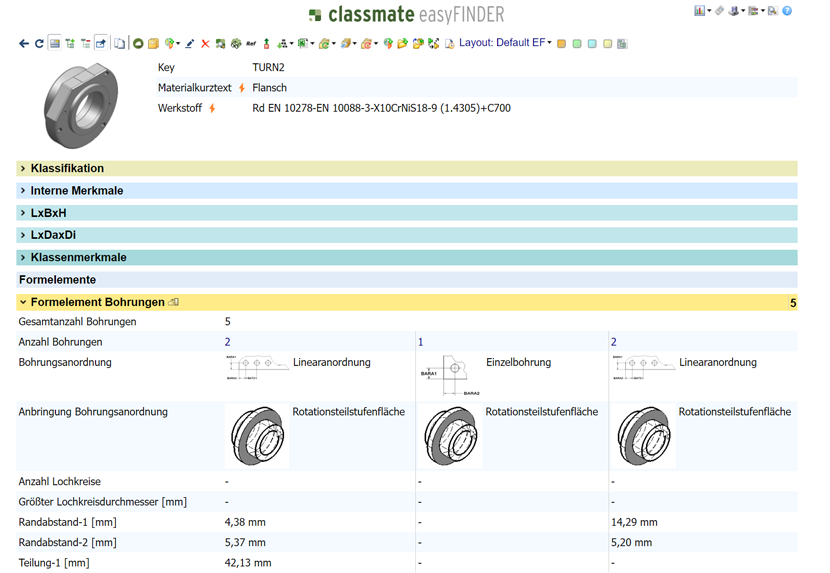
With simus classmate, you can search by geometry, by attributes, or both. In a combined search, you first find similar geometries and then narrow them down by attributes such as material or dimensions. Our search engine, classmate easyFINDER, also finds partial geometries of models, mating parts, and tools. If you like, the search runs right inside your CAD program, so you never have to leave your familiar environment.

With our software module, classmate CAD, you analyze your 3D models fully automatically and prepare them so engineers can find and reuse them. The process has four steps:

  1. Analyze: The software reads geometry and file information from every model.
  2. Classify: Each model is assigned to your own classification system. A best-practice rule set for machinery and plant engineering is already built in.
  3. Add attributes: Technical attributes are filled in automatically, with no extra work for engineering.
  4. Make it findable: The geometric fingerprint makes every model findable through similarity search. On request, the data is synchronized with your ERP system, for example SAP.

This also works retroactively for existing libraries. The result: Your library is classified, indexed, and ready to use, and parts and variants are faster to reuse.

The algorithm in simus classmate, proven over many years, classifies 3D models automatically based on their geometry and file information and assigns them to a classification system. You can use your own classification system. A built-in best-practice rule set for machinery and plant engineering serves as a starting point and can be adjusted as needed. Automatic classification replaces manual upkeep, ensures consistent criteria, and improves data quality.

By letting engineers check whether a similar part already exists before every new design. Similarity search makes that possible in seconds. The Model Monitor automatically shows how many similar parts already exist and what they cost to manufacture. With geometric comparison, you can verify that an existing part really fits. Fewer duplicates mean lower manufacturing, inventory, and administrative costs.

The geometric fingerprint is a compact, unique description of all geometric details of a 3D model. simus classmate generates it automatically when a model is captured. It makes models comparable and searchable, regardless of file names, part numbers, or manually maintained descriptions. Two parts with similar geometry have similar fingerprints and are therefore recognized as similar.

Yes. Even large existing CAD libraries can be captured, classified, and indexed automatically after the fact. You don’t have to start from scratch or rework any models by hand. Afterward, your data can be found through geometric similarity search.

With geometric comparison in simus classmate, you compare two 3D models and see right away where they differ, even if they look identical at first glance. That lets you quickly decide whether an existing part can be reused or whether a new one is truly needed.

Yes. classmate easyFINDER, the browser-based search engine of simus classmate, integrates with all common CAD systems. You can then search right in your familiar environment. classmate CAD offers interfaces to Autodesk Inventor, CATIA, NX, PTC Creo Parametric, Solid Edge, and SolidWorks. For the complete list of supported CAD, PDM/PLM, and ERP systems, see the overview of simus classmate interfaces

simus classmate synchronizes material master data, classifications, and attributes directly and automatically with SAP (SAP ERP and SAP S/4HANA). Changes are transferred quickly, securely, and traceably. There are also interfaces to many PDM/PLM systems, for example Autodesk Vault, Teamcenter, PTC Windchill, SOLIDWORKS PDM Professional, SAP ECTR, and PRO.FILE. To see exactly what is supported, check the overview of simus classmate interfaces.

Our product module classmate DRAW analyzes 2D drawings with AI and extracts dimensions, tolerances, fits, threads, surface finishes, materials, and GD&T. This manufacturing information (PMI) is automatically assigned to the 3D model and can be exported as STEP AP242, including as an assembly. This lays the foundation for Model-Based Definition (MBD). You can also search drawing content by free text and find similar drawings using a reference drawing. The AI runs entirely within the simus system, on-premise or via simus connect.

Look for software that automatically analyzes and classifies CAD models and makes them findable through their geometry, rather than relying on manual upkeep. These criteria can help you choose:

  • Automatic analysis and classification instead of manually maintaining attributes
  • Geometric search, not just search by file name or part number
  • Retroactive capture of your existing library, without starting from scratch
  • Customizable classification system that fits your organization
  • Integration with your CAD system as well as ERP and PDM/PLM, for example SAP
  • Deployment options: on-premise or as a cloud solution (SaaS)

simus classmate covers all of these. For details on interfaces, see the overview of simus classmate interfaces.

For larger or long-established libraries, automatic classification is usually the better choice. It applies the same rules everywhere, delivers consistent criteria, and avoids the errors that creep in with manual upkeep. Attributes are filled in within seconds, and engineering has no extra work. The underlying rule set can be adapted to your classification system, so special cases still follow your requirements. Manual classification remains useful, at most, for individual exceptions.

By first classifying the data automatically and giving it a geometric fingerprint. Then use simus classmate to search by geometry, by attributes, or both. Content from 2D drawings can also be searched by free text once it has been extracted with the product module classmate DRAW. Users can list all relevant parts for a search criterion in about 10 seconds with a single click. Learn more in the Gessmann case study.