classmate COSTPILOT
Project Cost Controlling Made Easy

classmate COSTPILOT
Get a handle on project cost controlling, even for complex projects!
classmate COSTPILOT: A New Approach to Cost Control.

Production projects are frequently extremely complex. In order to plan and make decisions, it is important for project teams to have a constantly up-to-date view of the costs. This is where our innovative COSTPILOT software comes in, by providing a flexible, fast and clear view of project costs for production projects.
The software displays the individual components of the production project in a BOM structure. Any number of projects can be managed and linked together. The structure can be adapted at any time during the project. Different variants can be mapped, including those based on individual substructures.
Estimated prices can be used for initial costing if prices have not yet been determined at the start of the project. Over the course of the project, the estimated prices can then be gradually replaced by the actual costed prices. You can see at a glance in the interface whether a price is estimated or already validated.
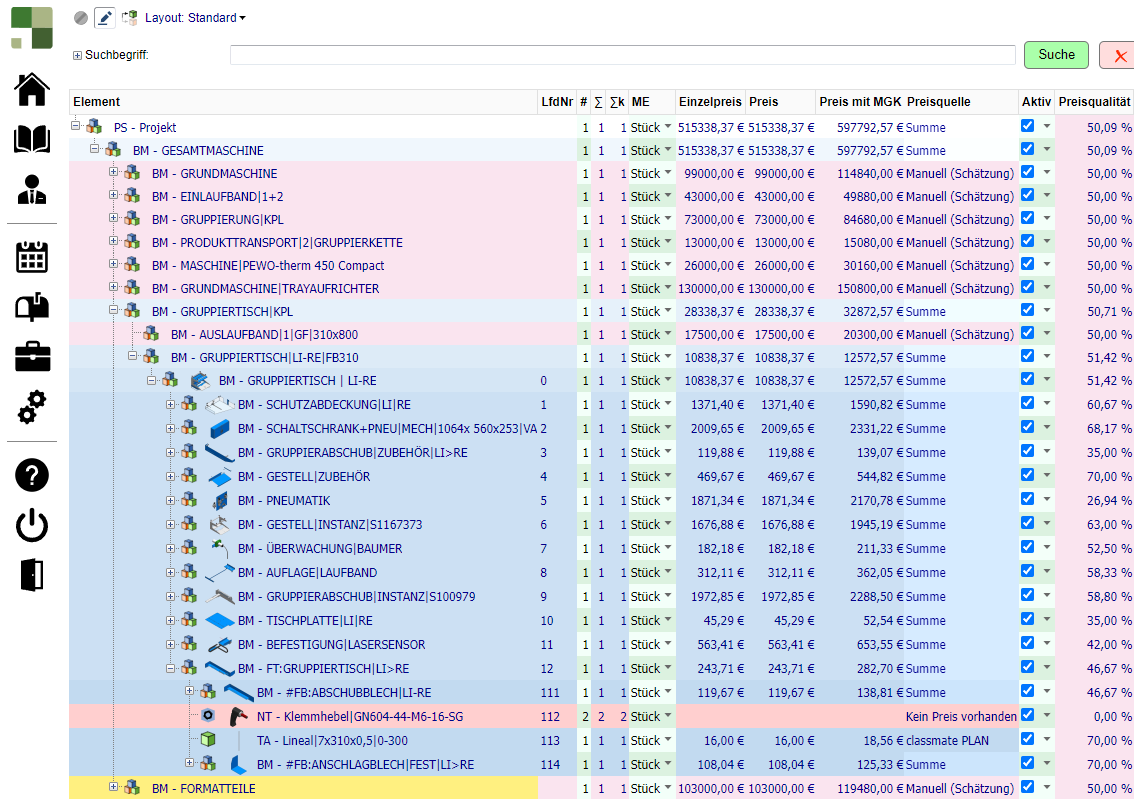
COSTPILOT allows you to see at a glance which costs are still estimated.
Various sources, including Excel files, SAP or other ERP systems, CAD models, JT files and many more can be dynamically integrated. Dynamic means that updates can be made on the fly at the touch of a button. Direct access to the connected application is also possible, for example to SAP Material Master.
Interfaces for all standard systems are available. Custom interfaces can be developed.

classmate COSTPILOT retrieves price scale information from SAP
COSTPILOT can be used to define and map different costing scenarios (e.g. currency risks, worst case scenario). Snapshots of the status of projects on specific dates can be taken for documentation purposes.
Target costs can always be defined and compared with actual costs at a glance. Project managers monitor costs continuously and transparently to ensure that deviations from the planned budget are identified in good time.
COSTPILOT is browser-based. This ensures that the interface can be easily scaled to suit requirements and the monitor size. The interface can be set to German or English.
A built-in 3D viewer can be used to graphically display components for a quick overview. Diagrams can be created and then exported to present the project status to stakeholders.
Regardless of whether a company is large or small, the challenges associated with development costing are similar everywhere. Excel is often used for costing calculations. Perhaps you know this from your company too? However, using Excel to manage large development projects has its limitations:
COSTPILOT allows you to solve these problems and receive a comprehensive, well-structured and easily comprehensible overview of your project costs at any time!
When it comes to producing components in-house, our classmate PLAN software module is the perfect source for managing project costs with COSTPILOT.
This software module is embedded into your business architecture in customised form and incorporates your production processes, machine costs and other cost structures into the calculation. classmate PLAN makes it possible to automatically and very accurately pre-calculate (planned) components for which only the CAD model previously existed. And with an accuracy of +/- 5%! These figures are then included in the cost overview with COSTPILOT for each component required. This gives you a very accurate estimate of future manufacturing costs at a very early stage in the development process.
Find out more about classmate PLAN and calculating manufacturing costs »

We prepare your data in a flexible, efficient and systematic way for the best possible use in sophisticated digital processes. Surprise yourself with the potential of your data! We are happy to advise you on designing innovative and sustainable data processes.

